
How to login to Uni Datacenter clusters
If you are reading this probably you already have a reserved cluster at Uni Datacenter. If not, check out www.uni-datacenter.com .
To login to your computing resources at Uni Datacenter, you would need a few important credentials that has been sent to you at your registered email. If you are facing any difficulty, please contact at cluster-admin@uni-datacenter.com. You would need the following information -
Username
Cluster Name
Available Port
Password
SSH keys
To login to the cluster, write the following command along with the appropriate SSH keys, port number, username, and cluster name as shown below.
ssh -i ~/.ssh/keys/id_new -p XXXX <username>@<clusterName>.uni-datacenter.comUpon hitting enter, you would be asked with a passphrase for the ssh-key and a following message -
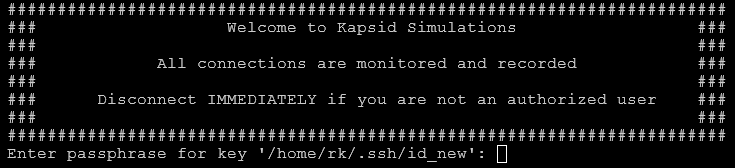
After you have successfully entered the passphrase, you will be greeted with a welcome message from the cluster. Congratulations, you have successfully logged in to your computing cluster.

Now you have access to your computing nodes. You can navigate around using CLI (Command Line Interface). If you want to know more about some of the useful CLI commands, please check out our blog on 'Useful CLI commands' (here).
If you have any queries or problems related to logging into your computing space, please contact admin-help@uni-datacenter.com.


